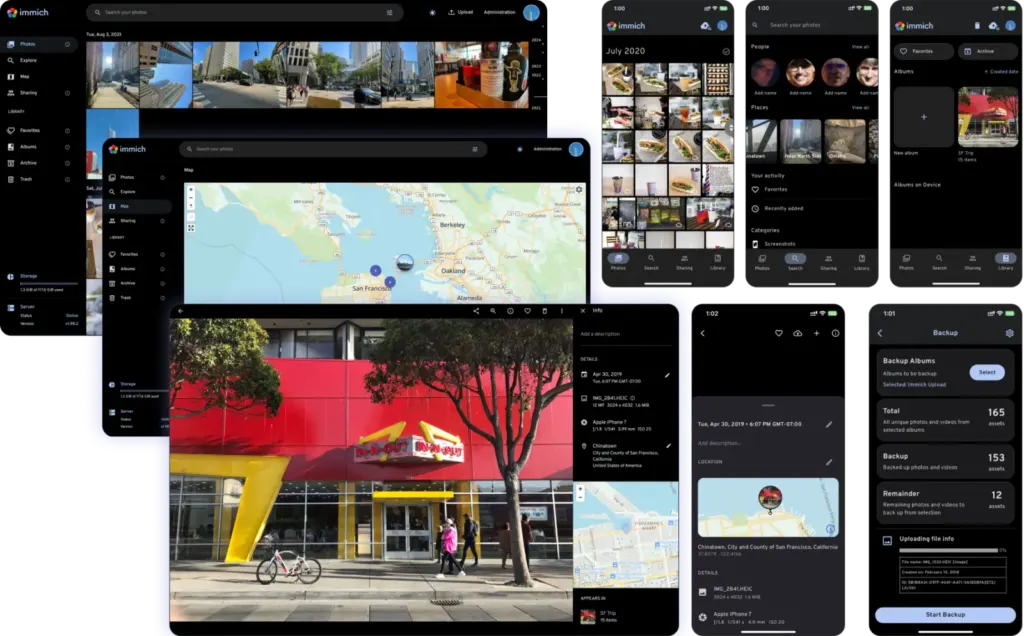
You can try Immich, a self-hosted Google Photos alternative according to its GitHub topics, in your browser right now. The project’s README links to a live demo at demo.immich.app and prints the login for it.
“Self-hosted” means you run the server yourself instead of renting space in someone else’s cloud. Immich’s repository describes it as a “high performance self-hosted photo and video management solution.”
It’s open source under the AGPL-3.0 license, written mostly in TypeScript, and has about 119,800 GitHub stars. The latest release, v3.4.2, shipped on November 18, 2026, and the repo showed activity as recently as November 21, 2026.
What is Immich, in plain words?
Think of it as your own photo library with a phone app and a web app. You upload photos and videos, browse them, search them, and share albums with other people.
The repository was created on February 3, 2022. Its topics include google-photos, google-photos-alternative and backup-tool, which suggests the project positions itself as a Google Photos alternative.
Why is Immich useful?
The README’s feature table points to a few everyday jobs:
- Backing up the photos on your phone to a server you control.
- Sharing albums with family, sharing publicly, or using partner sharing.
- Finding old pictures without remembering when you took them.
Three standout features
Search that goes beyond filenames
The README lists search by metadata, objects, faces and CLIP, on both mobile and web. CLIP is a kind of AI model that connects text and images, which is why it’s listed next to object and face search.
The same table includes facial recognition and clustering, plus a “Memories (x years ago)” view.
Phone backup that runs by itself
The mobile app supports auto backup when the app is opened, background backup, and selective album backup. The README also lists duplicate prevention on both mobile and web.
Multi-user and sharing tools
Immich supports multiple users, albums and shared albums, partner sharing, public sharing, OAuth sign-in and API keys. OAuth lets people sign in through an existing account instead of a new password.
The README also lists RAW format support, LivePhoto and MotionPhoto backup and playback, and a user-defined storage structure.
How to try the Immich demo
Open demo.immich.app in a browser and sign in with the credentials the README publishes:
- Email: demo@immich.app
- Password: demo
To test the mobile app against the demo, enter https://demo.immich.app as the Server Endpoint URL.
Since this is a public demo, avoid uploading personal photos.
How to install Immich on your own server
Here’s the honest part: the README we worked from contains no install commands, so we won’t print any. It sends you to the official documentation instead.
Start with the install requirements page, then follow the install guides at immich.app. The notes don’t list supported operating systems or hardware, so check that page before you commit a machine to it.
The README does say there’s a mobile app and a web app, but it doesn’t name the phone platforms. Confirm that your phone is supported in the docs.
Immich vs Google Photos: what the notes support
The only comparison our notes back up is positioning: Immich’s own topics tag it as a Google Photos alternative. They say nothing about Google Photos pricing, storage limits or features, so we won’t claim Immich is cheaper, better or worse.
What we can show is how Immich’s own mobile and web apps differ. This table is drawn from the README’s feature list.
| Feature | Mobile | Web |
|---|---|---|
| Auto backup when the app is opened | Yes | N/A |
| Background backup | Yes | N/A |
| Search by metadata, objects, faces and CLIP | Yes | Yes |
| Facial recognition and clustering | Yes | Yes |
| Partner sharing | Yes | Yes |
| Offline support | Yes | No |
| Tags | No | Yes |
| 360-degree image display | No | Yes |
| Administrative functions (user management) | No | Yes |
| API keys | N/A | Yes |
Limitations and who should skip it
You become the sysadmin. Self-hosting means you run the server and keep it updated. If that sounds like a chore, a hosted service may suit you better.
Backups are still your job. The README opens with a warning to follow a 3-2-1 backup plan for your photos and videos. That means three copies, on two kinds of storage, with one kept off-site. Immich is not a substitute for that plan.
Features differ by app. Per the README table, tags, 360-degree display and administrative functions are web-only, and offline support is mobile-only.
It’s a busy project. The repo showed 667 open issues when these notes were pulled. The v3.4.2 release notes are mostly bug fixes, plus a mention of a new FUTO Backups version that the notes don’t explain.
Who should switch, and who should wait
Our take: Immich makes the most sense if you’re comfortable running a small server, want automatic phone backup, and like the idea of a library you manage yourself. The feature list is broad enough that it reads like a serious attempt at replacing a cloud photo service.
If you’ve never maintained a server, or you don’t have a place to run one, wait. And if you do switch, don’t treat Immich as your only copy of anything.
The notes don’t cover migration from Google Photos or any other service, so check the docs before you plan a move.
Where to go next
Spend a few minutes in the demo, then read the requirements page before you decide whether running your own server is worth it. Pay attention to the backup warning if you do.
- GitHub repository: github.com/immich-app/immich
- Official website: immich.app
- Documentation: docs.immich.app
- Install requirements: docs.immich.app/install/requirements
- Release notes: v3.4.2
Screenshot: immich-app/immich (AGPL-3.0 licence)
Sources
- immich-app/immich on GitHub (github.com)
- Release v3.4.2 (github.com)
This article was researched and drafted with AI assistance and reviewed against the linked sources by the Nexonic editorial team.


Join the conversation