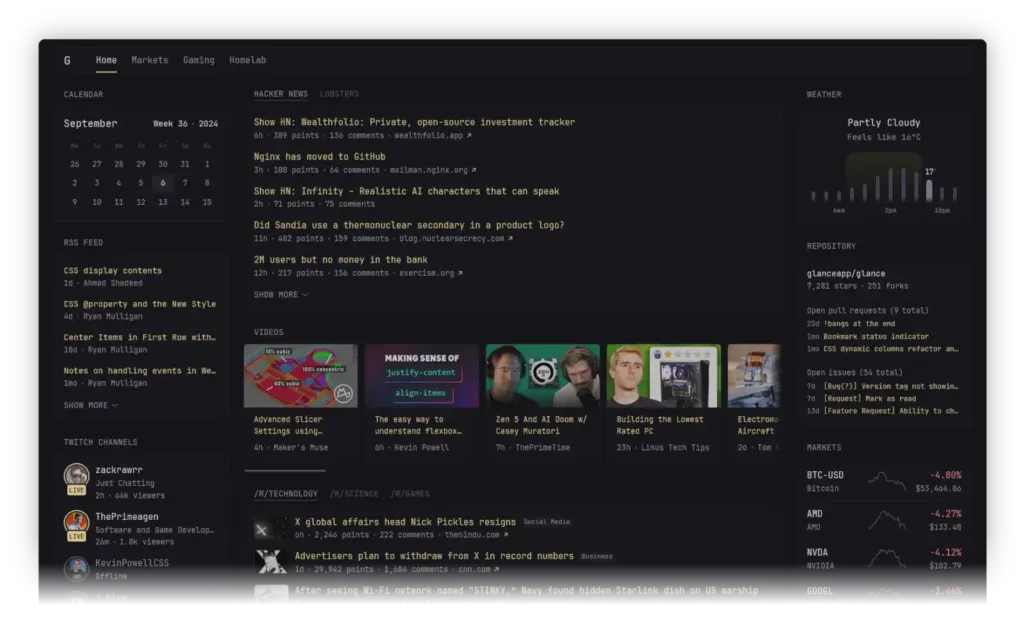
The Glance self-hosted dashboard pulls RSS feeds, subreddit posts, YouTube uploads, weather, market prices and server status onto one page that you run yourself. According to its README, it ships as a single binary under 20 MB. If your browser’s start page is more empty than useful, that’s the pitch.
This guide is based on the project’s README and its latest release notes. We haven’t run Glance ourselves, so the performance claims below are the project’s own.
What is the Glance self-hosted dashboard?
Glance describes itself as a self-hosted dashboard that puts all your feeds in one place. Self-hosted means you run it on your own computer, home server or rented server instead of signing up for someone else’s service. You open it in a browser, and it shows boxes (called widgets) arranged in columns.
You build the page by editing YAML files. YAML is a plain-text format that uses indentation to organize settings, so you’ll be editing a text file rather than dragging boxes around.
Why a self-hosted start page is useful
The README lists the widgets that come with Glance: RSS feeds, subreddit posts, Hacker News posts, weather forecasts, YouTube channel uploads, Twitch channels, market prices, Docker container status, server stats and custom widgets. It also says there are “many more” described in the configuration documentation.
Here’s how that could play out for different readers. These are our examples, not claims from the project.
- Everyday users: one tab with your favorite blogs, a weather box, a few YouTube channels and some stock tickers, instead of five bookmarks.
- Small-business owners: an industry news feed and market prices on a shared page for the office. The README doesn’t pitch Glance for business use, so judge that fit yourself.
- Developers and homelab fans: Glance offers a Docker containers widget and a server stats widget, and the v0.8.8 release notes mention a release widget that can follow repositories. Together they could give you a status-and-updates page for your own machines.
Key features
- Light footprint. The README claims low memory usage, few dependencies and minimal vanilla JavaScript (plain JavaScript with no big framework). It says uncached pages usually load within about one second, depending on your internet speed and how many widgets you use.
- Layouts and pages. Different layouts, as many pages or tabs as you need, and numerous options for each widget. Some widgets come in multiple styles.
- Theming and custom CSS. Pick from the available themes or tweak a few numbers to make your own. Custom CSS is supported too.
- Community extras. The README links to community widgets and preconfigured pages, so you don’t have to start from a blank file.
The README’s example config shows the shape of the YAML. Pages contain columns, columns contain widgets, and each widget has its own options, such as an RSS widget with a feed list and a limit. The example weather widget is set to London with metric units, so change that for your own location.
How to install Glance (and see your first page)
The README offers Docker Compose (marked as recommended), a manual Docker Compose file, and precompiled binaries for Linux, Windows and macOS on x86, x86_64, ARM and ARM64. Pick one.
Option 1: Docker Compose with the provided template (recommended)
This creates a glance directory with template files inside:
mkdir glance && cd glance && curl -sL https://github.com/glanceapp/docker-compose-template/archive/refs/heads/main.tar.gz | tar -xzf - --strip-components 2Then edit the files you want to change:
docker-compose.ymlfor the port, volumes and other container settingsconfig/home.ymlfor the widgets and layout of the home pageconfig/glance.ymlto change the theme or add more pages
You may also want .env (environment variables available inside the config files) and assets/user.css (custom CSS). When you’re ready:
docker compose up -dIf something goes wrong, check the logs:
docker compose logsOption 2: Docker Compose, manual
Create a docker-compose.yml with this content:
services:
  glance:
    container_name: glance
    image: glanceapp/glance
    restart: unless-stopped
    volumes:
      - ./config:/app/config
    ports:
      - 8080:8080
Then download the starter config and start the container:
mkdir config && wget -O config/glance.yml https://raw.githubusercontent.com/glanceapp/glance/refs/heads/main/docs/glance.yml
docker compose up -d
For logs on this route, the README uses:
docker logs glanceOption 3: Run the binary
Grab a build from the latest release page. On Linux, the README suggests placing it in /opt/glance/ and starting it with a systemd service (the Linux tool that launches programs at boot). By default it looks for a glance.yml next to the binary. To point it somewhere else:
/opt/glance/glance --config /etc/glance.ymlTo get a starter config on Linux:
wget https://raw.githubusercontent.com/glanceapp/glance/refs/heads/main/docs/glance.ymlOn Windows, download and extract the release zip (most likely glance-windows-amd64.zip on a 64-bit system) into a folder. Create a glance.yml in the same folder, paste in the starter config, run the executable and visit http://localhost:8080.
The README also lists third-party install routes: a Proxmox VE helper script, a NixOS package, Hostinger, Coolify.io and Podway. We haven’t looked at those, so check each one’s own page.
A quick first-run check
After docker compose up -d, open your browser. The manual Compose file above maps port 8080, so http://localhost:8080 is the address to try (with the template, the port lives in docker-compose.yml). If a page loads with widgets, the install worked. If it doesn’t, run the logs command for your route. That short test tells you whether the setup is sound. Whether Glance earns a place as your home tab takes longer to judge.
Three things to try next
- Trim the starter page. Edit
config/home.yml(template route) orglance.ymland keep only the five or six widgets you’d actually read. Change the weather location while you’re there. - Try a theme. Browse the README’s themes page, or add your own styling in
assets/user.csson the template route. - Borrow a layout. Look through the preconfigured pages and community widgets for ideas before writing your own.
Common issue: requests timing out
The README names ad-blocking DNS services such as Pi-hole and AdGuard Home as the most common cause of request timeouts on pages with many widgets. The full troubleshooting text was not available to us, so read the “Common issues” section of the README for the details. It also has a note on a rarer Podman timeout case; check the README directly.
Limitations and who should skip it
| What stands out | What to watch |
|---|---|
| Small and fast: single binary or small Docker container | Configuration is done through YAML files |
| About ten built-in widget types, plus the README’s “many more” and community widgets | You have to host and update it yourself |
| Themes, custom CSS and multiple pages | The latest release is v0.8.8, so the version number is still below 1.0 |
| Binaries for Linux, Windows and macOS | 325 open issues on GitHub at the time of our notes |
Our take: skip Glance if you want a point-and-click app with an account and a support desk. You’ll need to be comfortable editing a text file and, for the easiest route, running Docker commands. If a YAML file sounds like a chore, a hosted start page will be less work.
The licence is AGPL-3.0. If you’re only running Glance for yourself or your own team, that rarely matters, but read the licence before building a product on top of it.
On security, the v0.8.8 release notes say “a number of vulnerabilities” were fixed and credit six contributors by their GitHub handles. The notes don’t describe the issues. Our opinion: that’s a good sign people are looking, and a reason to keep your install updated, especially if you expose it beyond your home network.
Is Glance actively maintained?
Going by the repository facts, yes. The project was created on April 27, 2024, has about 38,300 stars and 1,529 forks, and shows activity as recently as November 7, 2026. That’s also the date of v0.8.8, which fixed bugs including the release widget with include-prereleases, the search widget blocking shortcuts that use the S key, markets charts when all history values are 0, and IPv6 addresses in sock-path for the docker-containers widget.
Alternatives
The README doesn’t compare Glance to other dashboards or feed readers, and our notes don’t name any, so we won’t guess. If you’re shopping around, search GitHub for the topics the project lists, such as homepage, startpage and rss-reader, and compare for yourself.
Quick answers
Does Glance work on Windows or macOS?
Yes. The README says precompiled binaries exist for Linux, Windows and macOS, and Docker is the other route.
What licence does Glance use?
AGPL-3.0. The main language is Go.
How do I change what’s on the page?
Edit the YAML config. The README points to its configuration documentation for layout, pages and widgets.
Will it work on my phone?
We’d expect so, since the README says Glance is optimized for mobile devices, though we haven’t checked it on a phone. As general advice rather than a README fact, your phone also needs a network path to the server, such as your home Wi-Fi or a VPN.
The takeaway
If you already run Docker anywhere, the template route is one command, a config edit and docker compose up -d. Load the page in your browser, then trim the starter widgets down to what you’d read daily. The code and docs live in the glanceapp/glance repository, and the latest changes are in the v0.8.8 release notes.
Screenshot: glanceapp/glance (AGPL-3.0 licence)
Sources
- glanceapp/glance on GitHub (github.com)
- Release v0.8.8 (github.com)
This article was researched and drafted with AI assistance and reviewed against the linked sources by the Nexonic editorial team.


Join the conversation